TRAP & HIP-HOP MIDI GENERATOR

STOP DIGGING. START COOKING.

Pick key, scale and progression. Hooka writes a four-bar starter melody and chords. Drag the MIDI into your DAW and build the beat around it.

4 bars · MIDI lead, chords or full export Royalty-free · Commercial use VST3 · AU · STANDALONE
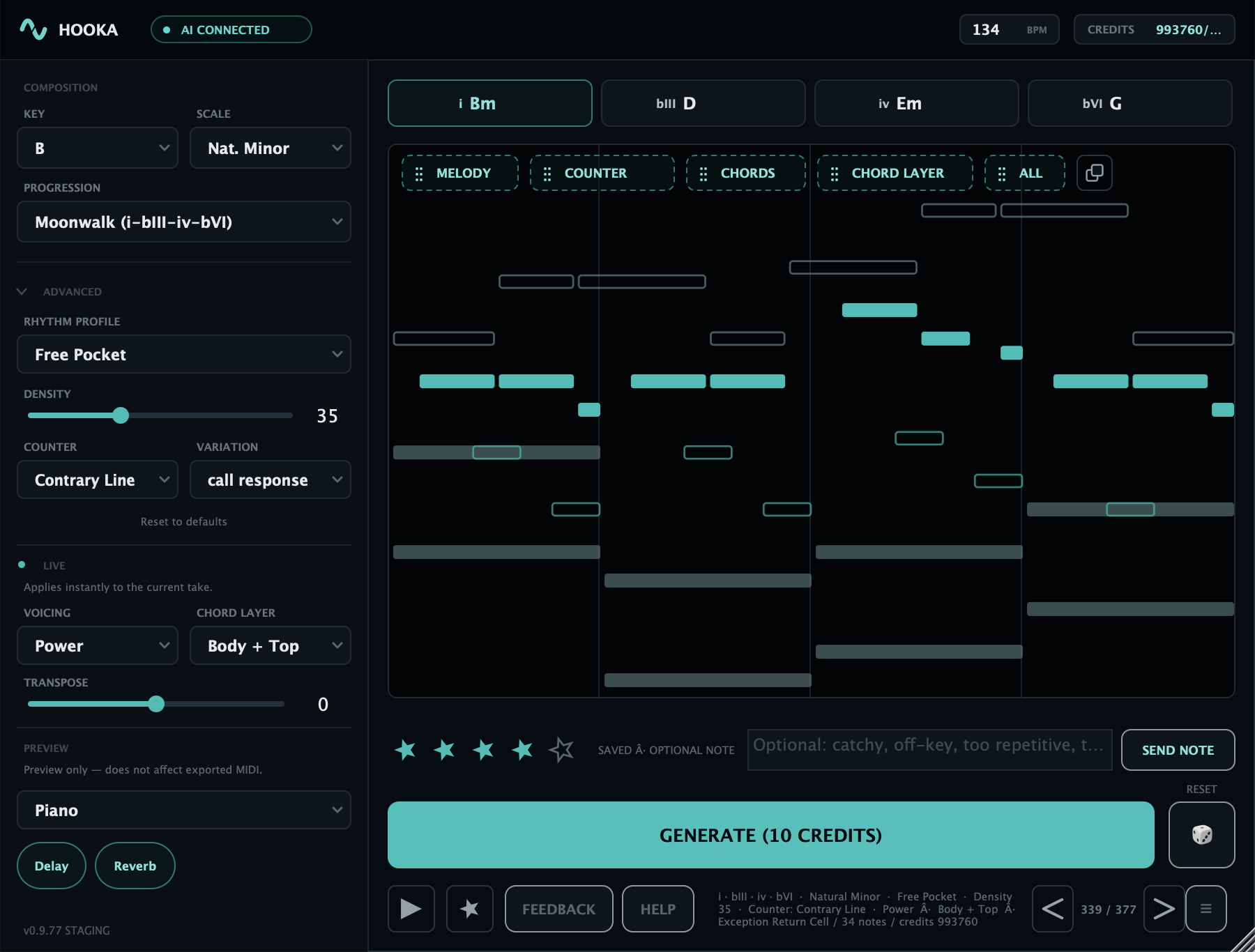
Hooka plugin with key, scale, progression and advanced rhythm, counter and voicing controls, a piano-roll preview of melody, counter and chord layers, and a Generate button

Works with any VST3 / AU host

GET UNSTUCK.
STAY CREATIVE.

You set the rules.
Hooka writes the idea.
You take it from there.
28
Progressions

Loops, movement, journeys and tension. Every preset shows its chords, so you know the move before you generate.

Night Drive Downfall Gravity +25
16
Rhythms

The pocket of the melody, from sparse and half-time to bouncy triplets and driving pulses.

Drill Pocket Dembow Triplet Pocket +13
21
Variations

How the lead moves: call and response, staircases, leaps, orbits and hypnotic repeats.

Call Response Zigzag Snapback Hypnotic Anchor +18
9
Voicings

How the chords sit: stacked, opened up, inverted, arpeggiated or cut into stabs.

Open Arpeggio Stab +6
Over 1.3 million combinations per key.
Plus 6 counter lines and 3 chord layers. Pick every part yourself, or set it to Random and let Hooka choose.
  1. Set the directionPick the key, then choose your presets or leave them on Random.
  2. Hit generateHooka writes a four-bar lead and chords from scratch. Preview the take, then export the Lead, Chords or both as Full MIDI.
  3. Drag into your DAWDrop the MIDI into your piano roll and edit every note. Hooka claims no royalties and requires no credit.

RAW INGREDIENTS.
YOU COOK.

Thirteen of our favorite takes, straight out of the plugin.
No MIDI edits, one sound. Key and progression shown for every take.
1 / 13

30 GENERATIONS.
NO PAYMENT.

Hooka is free right now.
No card, no subscription, nothing to buy.
Paid plans come later.
Free · Available now

FREE

30 generations
300 credits · One-time on signup
  • Four-bar lead + chords
  • Lead, Chords or Full export
  • Royalty-free MIDI output
  • No card required
  • Out of generations? Send feedback, get 20 more
Start free
Coming later

PAID PLANS

Not yet
Nothing to buy today
  • More generations when you need them
  • Your free generations stay yours
  • No card on file, no surprise charges
Coming later

GET HOOKA.
FIGHT BEAT BLOCK.

macOS & Windows.
VST3 · AU (macOS) · Standalone.
Sign in with your Hooka account.

Seeing a security warning? That's expected. Hooka isn't code-signed yet, so your system can't verify it. Here's how to install it anyway:

macOS

  1. Open the .pkg. When macOS blocks it, click Done.
  2. Open System Settings → Privacy & Security and scroll down.
  3. Next to "Hooka.pkg was blocked", click Open Anyway and confirm with your password.
  4. Finish the installer, then rescan plugins in your DAW.

Windows

  1. Run the setup. If "Windows protected your PC" appears, click More info.
  2. Click Run anyway and finish the installer.
  3. Rescan plugins in your DAW.
What's new?

HONEST
ANSWERS.

Everything a first-time Hooka user should know before signing up.